Who Owns Your Marketing Accounts? What to Ask a Digital Marketing Agency Before You Sign
You’ve been paying a marketing agency for months. The invoices arrive on time. So do the monthly reports: a tidy PDF with a few charts going up and to the right. Then you ask a simple question: “Can I log in to our Google Analytics?” The answer is no.
No analytics access. No view of the Meta ad account. No idea what the tracking is measuring, or whether it’s measuring anything at all. Just the agency’s summary of how well the agency is doing.
This happens more often than it should, and it’s one of the clearest red flags in digital marketing. If you’re working out what to ask a digital marketing agency before you sign, start here: who will own the accounts and the data?
The short answer: you should own everything
The accepted standard among reputable agencies is simple. The business owns its marketing accounts, and the agency is invited in as a user or partner. Every major platform is built for exactly this setup:
- Google Analytics lets you add people to your property with roles such as Administrator, Editor or Viewer.
- Google Ads lets an agency link your account to its manager account without owning it.
- Meta lets you add an agency as a partner in your business portfolio, sharing access to your pages, ad accounts and pixel.
There is no technical reason for an agency to keep your accounts in its own name and lock you out. When it happens, it’s a choice.
The simple test: if your agency disappeared tomorrow, could you still log in to every account and see every number? If the answer is anything other than yes, you don’t own your marketing. You’re renting it.
Why it matters more than you think
You can’t check the work
A report written by the people being paid is not the same as data you can see for yourself. Without access you can’t tell whether the leads in the report are real enquiries or bots. You also can’t tell whether “conversions” means sales or someone scrolling halfway down a page, or whether the ad spend went where you were told it went.
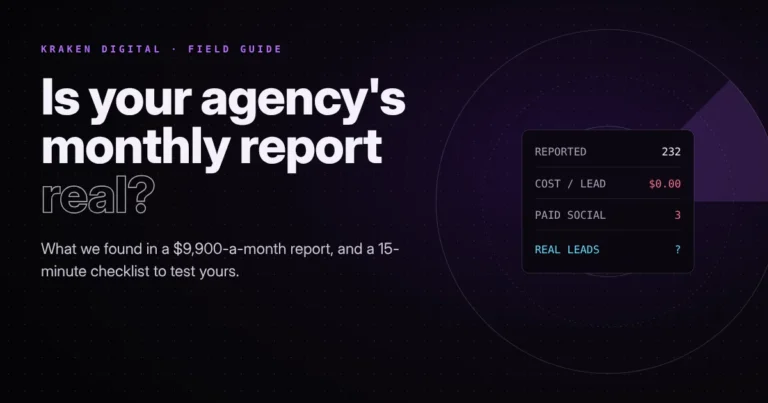
Already have reports you’re not sure about? Our guide on how to tell if your agency’s monthly report is real walks through a 15-minute check you can run yourself.
Your history walks out the door with them
Marketing data compounds. Years of analytics show seasonal patterns, which pages convert and where your best customers come from. A well-trained Meta pixel and your custom audiences are assets that took real money to build. If the agency owns those accounts, ending the relationship can mean starting again from zero, while you pay for the learning a second time.
Leaving gets expensive, which is the point
Some agencies don’t keep the keys by accident. If walking away means losing your data, your ad history and sometimes even your website or domain, plenty of businesses stay put. That isn’t loyalty. It’s lock-in.
Watch for contracts that say the agency “retains ownership” of accounts, pixels, ad history or the website “until all fees are paid”, or that charge a “migration” or “handover” fee. These clauses are how lock-in gets written down.
Your customers’ data is your responsibility
Analytics and ad platforms collect information about the people who visit your site. Your business is still accountable for how that is handled, so you should be able to see what’s being tracked and who can reach it.
The ownership checklist: 8 things that should be in your name
Before you sign with any agency, or right now if you already have one, check that your business is the owner of each of these:
Ownership check · tick what you own
Tick each account you can confirm is in your business’s name today.
0 / 8 · Start ticking to see where you stand.
If you use other platforms such as LinkedIn, TikTok, an email tool or a CRM, the same rule applies.
How to check who owns your accounts today
- Google Analytics: open Admin, then Property access management. If your email isn’t listed as an Administrator, or you can’t open it at all, ask why.
- Search Console: open Settings, then Users and permissions, and check that you’re shown as the Owner.
- Google Ads: open Admin, then Access and security. Check who has admin access and whose payment method is on file.
- Meta: in Meta Business Suite, open Settings and look at who owns the business portfolio, the ad account and the pixel (now called a dataset). Partners are listed separately from owners.
- Domain: run a WHOIS lookup or ask your registrar who the registrant is. For .au domains it should be your business.
- Website and hosting: log in to your website as an Administrator and confirm you can reach the hosting account. Whoever controls hosting controls updates, backups and security patches, which matters when a flaw like the PHP vulnerability that took government websites offline needs patching fast.
If you can’t get in, ask in writing for access at owner or admin level. A good agency will sort it within a day. Delays, excuses or a price tag on “handover” tell you what you need to know.
Run this check once a year, and again whenever a staff member, contractor or agency leaves. Remove anyone who no longer needs access, and make sure at least two people in your business hold owner or admin rights.
What to ask a digital marketing agency before you sign
Add these questions to your shortlist conversations. The answers will tell you a lot about how an agency operates:
- Will all accounts be created in my business’s name, or will you work in accounts I already own?
- Will I have admin access to analytics, ads and the website from day one?
- Can I see the live data any time, not just the monthly report?
- What exactly counts as a “conversion” in your reports, and how is it tracked?
- If we part ways, what do I get back, and is there a handover fee?
- Who owns the creative, copy and landing pages you produce for me?
Clear, confident answers are a good sign. Hesitation or “that’s how we do it with everyone” isn’t. It’s also worth getting the ownership terms into the contract, not just a sales call.
What a good agency actually looks like
When you’re working out how to choose a digital marketing agency, transparency should rank alongside results. A good agency:
- sets up accounts in your name, or works inside the ones you already have
- gives you full access and is happy for you to look around
- explains what its reports measure and lets you check the numbers yourself
- keeps a clear log of the work it has done each month
- hands everything back cleanly, with no fees and no friction, if you decide to leave
An agency confident in its results has nothing to hide in the data. One that guards the logins is usually guarding something else.
How we work at Kraken Digital
Our rule is simple: you own everything, and we just get a login. Your analytics, ad accounts, domain and website sit in your name from day one. You can see the live data whenever you like. Our monthly reports include a plain log of every action we’ve taken, so nothing happens in the dark. And if you ever want to move on, you take everything with you.
Not sure who owns your marketing accounts right now? Get in touch and we’ll help you find out, whether or not you end up working with us.
// keep diving